Virtual Staging Disclosure Rules Every Agent Needs
Virtual staging can help buyers picture a home, but undisclosed edits can damage trust. Learn the disclosure rules and safer listing practices.

Virtual staging disclosure means telling buyers when a listing photo has been digitally changed, not just improved. In California, qualifying altered listing images must be labeled and accompanied by access to the originals. Elsewhere, agents need to check local rules. The safest approach is clear labels, accessible originals and images that never misrepresent the property.
Picture this: a buyer loves the bright, furnished living room in your listing and books a showing. They arrive to find an empty room, a different view through the window and a fixture that was digitally removed. Your marketing advantage has become a trust problem.
This guide is for Realtors, listing agents, brokers and marketing teams using virtual staging or AI-edited property photos. It covers California's disclosure law, which edits matter, how to publish originals and how to protect buyer confidence.
Why are agents debating virtual staging versus virtual lying?
Virtual staging can make an empty property easier to understand. Buyers see how furniture might fit, where a dining table could go or how a spare room could work as an office. But showing a room's potential is different from changing what buyers believe they are buying.
That tension drives the debate. The r/realtors thread Virtual Staging has 557 upvotes and 151 comments, and Virtual staging or virtual lying? has 487 upvotes and 166 comments. The competing concerns are:
- Marketing value: Virtual furniture helps buyers visualize an empty space.
- Buyer expectations: Enhanced rooms may create impressions that do not match an in-person showing.
- Transparency: Clear disclosure separates presentation from physical reality.
- Professional judgment: Agents must decide whether an edit explains a property's potential or hides something important.
Those counts show the topic draws attention, not that either side speaks for every agent.
Our view: virtual staging is useful when it adds context without changing material facts about the home. A digitally furnished empty bedroom is different from a bedroom made to look larger. The goal is not to abandon digital staging but to make it understandable and trustworthy.
What does California AB 723 require for listing photos?
California has one of the clearest frameworks for digitally altered real estate images. Assembly Bill 723 took effect on January 1, 2026, and its requirements appear in California Business and Professions Code Section 10140.8.
Qualifying digitally altered listing images must be identified as altered, and the unaltered original must be provided alongside them, for example through a link or QR code. In practice:
- Identify the alteration: Make it clear the published image has been digitally altered.
- Provide the original: Give viewers access to the matching unaltered photograph.
- Keep the connection clear: Make it easy to see which original belongs to each altered image.
- Review every publishing channel: Check how the disclosure and original appear wherever the listing is advertised.
Basic changes to lighting, exposure and cropping are not treated as digital alterations. That matters because agents routinely brighten or frame photos without changing the property. Using AI to replace objects, alter scenery or generate a different appearance is another matter.
California agents should read the official statutory language rather than relying on social media summaries. This article is educational information, not legal advice.
What photo edits need virtual staging disclosure?
Not every edit is treated the same. Exposure correction helps viewers see the original scene; adding virtual furniture or replacing the sky changes it. The table below summarizes common edits under California's framework. Outside California, requirements may differ.
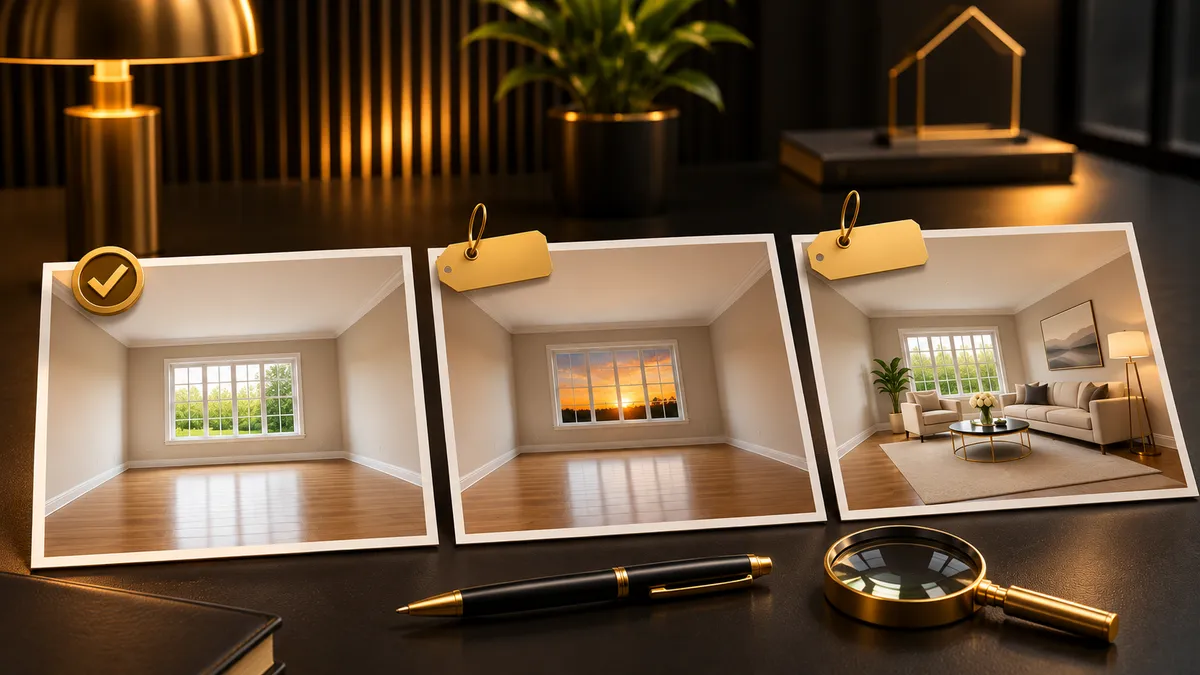
Brightening shows the real room; changing the sky or adding furniture changes what buyers see.
| Edit type | Disclosure needed? | Notes |
|---|---|---|
| Lighting/exposure | Generally no | Ordinary brightness and exposure corrections are excluded when they do not otherwise change the depicted property. |
| Cropping | Generally no | Basic cropping is excluded, but avoid using framing to create a misleading impression. |
| Sky replacement | Yes, generally | Replacing the actual sky changes what the original photograph depicts. |
| Virtual furniture | Yes | Adding digitally generated sofas, beds, tables, or other furnishings is a qualifying alteration. |
| Removing fixtures or defects | Yes; avoid misleading edits | Removing permanent features or concealing visible problems can misrepresent the property even when labeled. |
| AI day-to-dusk | Yes, generally | Replacing daylight conditions with an AI-generated evening scene goes beyond ordinary exposure correction. |
| Changing views | Yes; avoid misleading edits | Replacing or modifying what appears outside windows can materially distort buyer expectations. |
These are practical readings of the categories in California's digital alteration statute, not legal rulings on every technique. Brightening a dark kitchen is different from digitally replacing its cabinets, and adding a virtual sofa is different from removing a structural feature to make a room look bigger.
A label does not make a misleading image acceptable. If an edit changes something buyers would expect to see at a showing, the better choice is usually not to publish that version. For more on AI-assisted property marketing, see our AI for Realtors resource.
Want listing visuals that attract buyers without disclosure headaches?
We help real estate teams build content workflows that keep property photos, staging disclosures and listing marketing organized.
How should agents label virtually staged photos?
A disclosure works best when buyers can understand it without digging through listing remarks. Use direct language such as "Virtually Staged" or "Digitally Altered" near the affected photo, and avoid vague phrases that leave buyers guessing.
A practical workflow:
- Preserve the original: Save the unaltered photo before any staging or AI editing.
- Create the staged version: Add furnishings without misrepresenting the property.
- Apply a visible label: Mark the staged image clearly.
- Connect the original: Place the original alongside the edited image or provide a link or QR code.
- Check the published listing: Confirm the label and original survive the upload.
For listings with several staged rooms, organize the originals so buyers can match each pair. Do not make them hunt through an unrelated gallery to see what the property actually looks like.
What should a listing photo pair look like?
Imagine a two-column gallery. On the left, the empty living room with its real flooring, windows and walls. On the right, the same room from a comparable angle with digital furniture and a visible "Virtually Staged" tag. The staged version suggests how the space could be furnished; the original shows its actual condition. It also gives agents a consistent format for listing presentations.
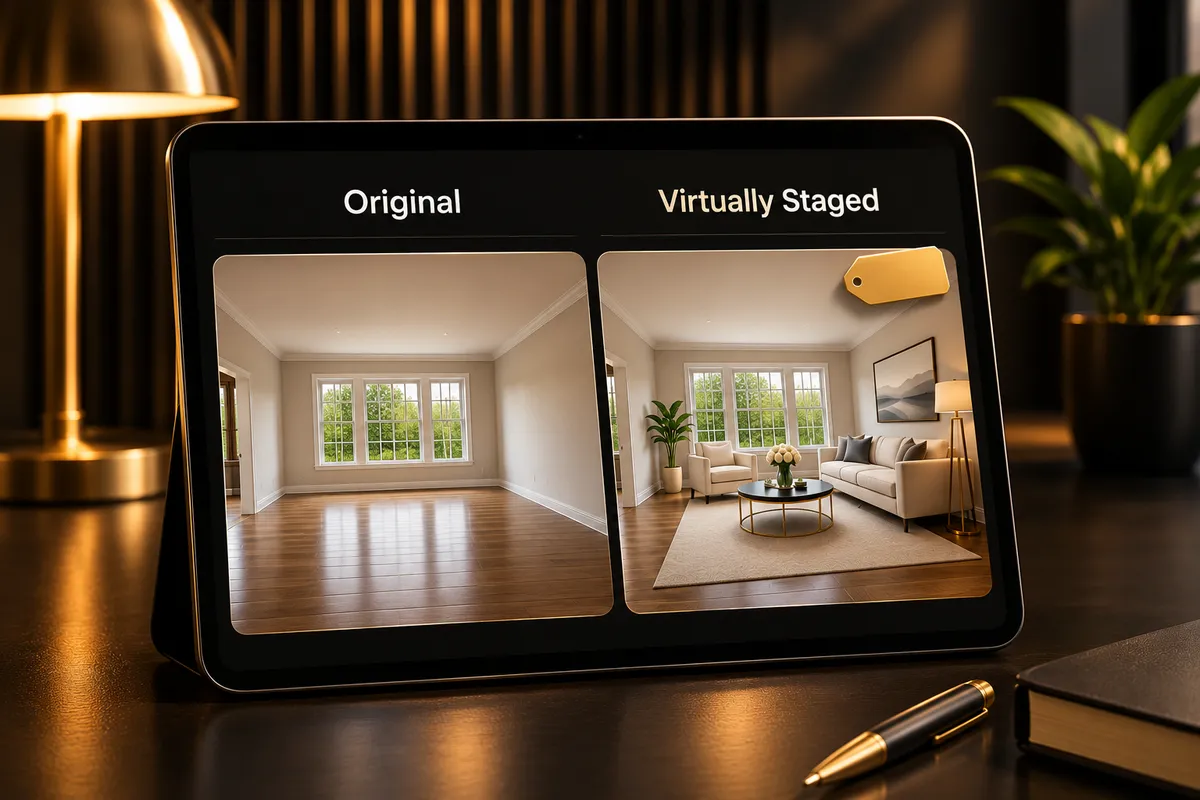
Show the original and the staged version side by side so buyers can match each pair.
Do you need to publish the original photo alongside the staged version?
In California, qualifying altered listing images require access to their unaltered originals under Section 10140.8. That does not necessarily mean a permanent side-by-side display on every platform; the original can be provided through a link or QR code. Side-by-side is often easier for buyers, though. Options include:
- Adjacent images: Publish the original right before or after the staged version.
- Paired gallery: Present the original and staged photo together.
- Direct image link: Give buyers a clear way to open the matching original.
- QR code: Use a scannable code that leads to the unaltered photo.
Whatever you choose, test it as a buyer would: can someone on a phone spot the altered image and reach the original without confusion?

Make the original easy to reach on a phone, through a link or a QR code.
The CRMLS digitally altered image guidance and FAQs add MLS-specific direction for agents using that system. Review it before setting up your upload process.
How do disclosure rules apply outside California?
Do not assume California's rules apply everywhere. Other states, MLSs and brokerages may have their own requirements for altered property images. Before publishing AI virtual staging, check three levels:
- State requirements: Whether state law or real estate regulators address altered listing photos.
- MLS rules: The photo policies of the MLS where the property will appear.
- Broker policies: Whether your brokerage requires extra labeling, approval or documentation.
An edit accepted on one platform is not automatically acceptable elsewhere. Also consider how the same photo appears on your website, portals, email and social channels; a disclosure visible in one gallery can disappear when an image is exported or reposted. Our real estate content marketing approach focuses on organized production and consistent property messaging across channels.
Can AI virtual staging improve listings without misleading buyers?
Yes. AI virtual staging works best when it illustrates possibilities rather than inventing property features. Start with an accurate photo, then use staging to show furniture placement, room function or scale. Practical boundaries:
- Keep permanent features: Preserve the real walls, windows, doors, fixtures and layout.
- Respect room proportions: Avoid arrangements that make a room look larger than it is.
- Protect property conditions: Do not hide damage, wear or other visible issues.
- Preserve actual views: Do not swap in more attractive scenery.
- Label the result: Make the virtual presentation clear wherever disclosure is required or appropriate.
AI can produce realistic interiors that depict a room that does not exist in that form, so human review matters. Before approving an image, compare it with the original and ask whether a buyer would recognize the same property at a showing.
The same discipline applies to social media marketing for agents: a staged image in a social post should keep the context that made it transparent in the listing.
What should your virtual staging disclosure checklist include?
Use this before publishing a digitally staged listing.
- Save the original, unaltered photographs before editing.
- Identify which images contain virtual staging or other qualifying digital alterations.
- Confirm that edits do not conceal defects or misrepresent permanent property features.
- Check that furniture and room proportions remain believable.
- Avoid replacing actual views or creating nonexistent property features.
- Apply clear "Virtually Staged" or "Digitally Altered" labels where appropriate.
- Provide accessible originals for qualifying California listing images.
- Review the applicable state, MLS, and brokerage requirements.
- Check the disclosure and original-image access on mobile devices.
- Verify that labels and original-image access remain available across marketing channels.
- Have a responsible team member approve the final image set before publication.
If you publish listings regularly, make this a repeatable approval step: keep original and staged files together, and assign someone to check the final published listing, not just the files from the staging tool.
Key takeaways
- California AB 723 took effect January 1, 2026, and requires labeling and original-image access for qualifying digitally altered listing images.
- Basic lighting, exposure and cropping adjustments are distinguished from substantive digital alterations.
- Virtual furniture, replaced scenery and changes to physical features deserve particular disclosure attention.
- Publishing the original alongside its staged version is a practical way to support transparency.
- Agents outside California should check their state, MLS and brokerage rules before publishing altered images.
Written by the RealtyCTL team, NextCTL's real estate marketing brand for Realtors and loan officers. We set up real estate content marketing and AI-powered marketing workflows that keep listing visuals organized and disclosures clear. Book a strategy call.
Virtual Staging Disclosure FAQs
Do you have to disclose virtual staging?
Yes, where law or listing rules require it. In California, qualifying digitally altered listing images must be labeled and paired with access to the unaltered originals under Business and Professions Code Section 10140.8. Elsewhere, check your state, MLS and brokerage policies. This is general information, not legal advice.
Is virtual staging legal?
Yes, virtual staging can be used in real estate marketing, but you must follow applicable disclosure and advertising rules. California regulates qualifying altered listing images through Section 10140.8. A label does not justify misleading changes to property features or conditions.
What photo edits need disclosure?
Substantive changes such as virtual furniture, replaced skies, altered views or digitally removed features generally fall within California's framework. Ordinary lighting, exposure and cropping adjustments are excluded. When unsure, check the California statute and your MLS guidance.
Do I need to show the original photo?
Yes, for qualifying altered listing images covered by California's law. The statute allows access through methods such as a link or QR code, so a permanent side-by-side display is not always required, though it is often clearer. Outside California, check your local rules.
Written By

Atiq Rezaul Hoque Turjo
Founder & CEO, NextCTL
Software architect with 16 years of experience, founder and CEO of NextCTL, and the builder behind the CTL stack: BackCTL, H22T and RealtyCTL.